将代理连接到网站
最后一个模块将把构建并部署代理中经过测试的托管代理连接到本地运行的 Tailspin Toys 网站。
完成本模块后,将获得:
- 一个保护 Foundry 凭据和对话标识符的本地 Azure Functions 代理服务。
- 一个支持无障碍访问、且端到端行为经过验证的聊天组件。
- 一项经过本地验证的集成,以及一个资源清理检查点。
场景
Tailspin Toys 的支持者需要在浏览游戏时获得基于目录的建议。Backer Concierge 应保留对话、支持键盘导航,并明确处理信息不可用的情况和错误。在提供这些便利的同时,不能向浏览器暴露服务凭据或内部对话详情。
从托管代理检查点继续
集成使用已有的托管代理,不创建新的 Foundry 资源。
- 返回前面模块中的同一个 Tailspin Toys 存储库、工作树分支和 Add a Backer Concierge assistant for catalog questions 议题会话。确认根目录下的
azure.yaml、代理源代码和目录均存在,并检查已记录的订阅、专用资源组、Foundry 项目、模型部署及经过测试的托管代理版本。 - 如果已清理资源,请在集成前恢复相关的项目和模型以及经过测试的托管部署。
构建服务器端代理服务
Tailspin Toys 完全采用预渲染。浏览器代码绝不能直接调用托管代理,也不能接收 Foundry 凭据。本地 Azure Functions 服务器端凭据边界负责向 Foundry 进行身份验证,并且只向浏览器返回代理的回答。浏览器发送每条消息时附带一个不透明的对话句柄;代理服务将该句柄映射到 Foundry 对话,而不暴露底层标识符。
代理服务是唯一允许访问 Azure 凭据的代码。在本研讨会中,Function 和网站在本地运行,Astro 开发服务器会将 /api 请求转发到 Function。
此研讨会代理服务仅用于本地开发,绝不能部署为匿名公共端点。生产环境集成需要针对具体应用设计身份验证和滥用防范机制,包括适当的速率限制或配额、CORS 限制、监控和费用控制。
-
在同一个 Copilot 会话中输入:
Add a local Azure Functions proxy in api for the static Astro site to call my deployed Backer Concierge during development. Use my existing local Azure sign-in, keep credentials and Foundry conversation identifiers out of the browser, return an opaque conversation handle, validate requests, sanitize errors, and add focused tests. Configure the Astro development server so /api requests reach the local Function. Don't create public deployment infrastructure. -
审查生成的代理服务及针对性测试,检查请求验证、错误信息脱敏、不透明对话句柄和仅限服务器端的凭据边界。要求 Copilot 运行针对性测试并修复所有失败项。
-
打开另一个终端,使用 Copilot 提供的命令启动本地 Function,并保持其运行。
-
返回聊天,要求 Copilot 测试本地代理服务:
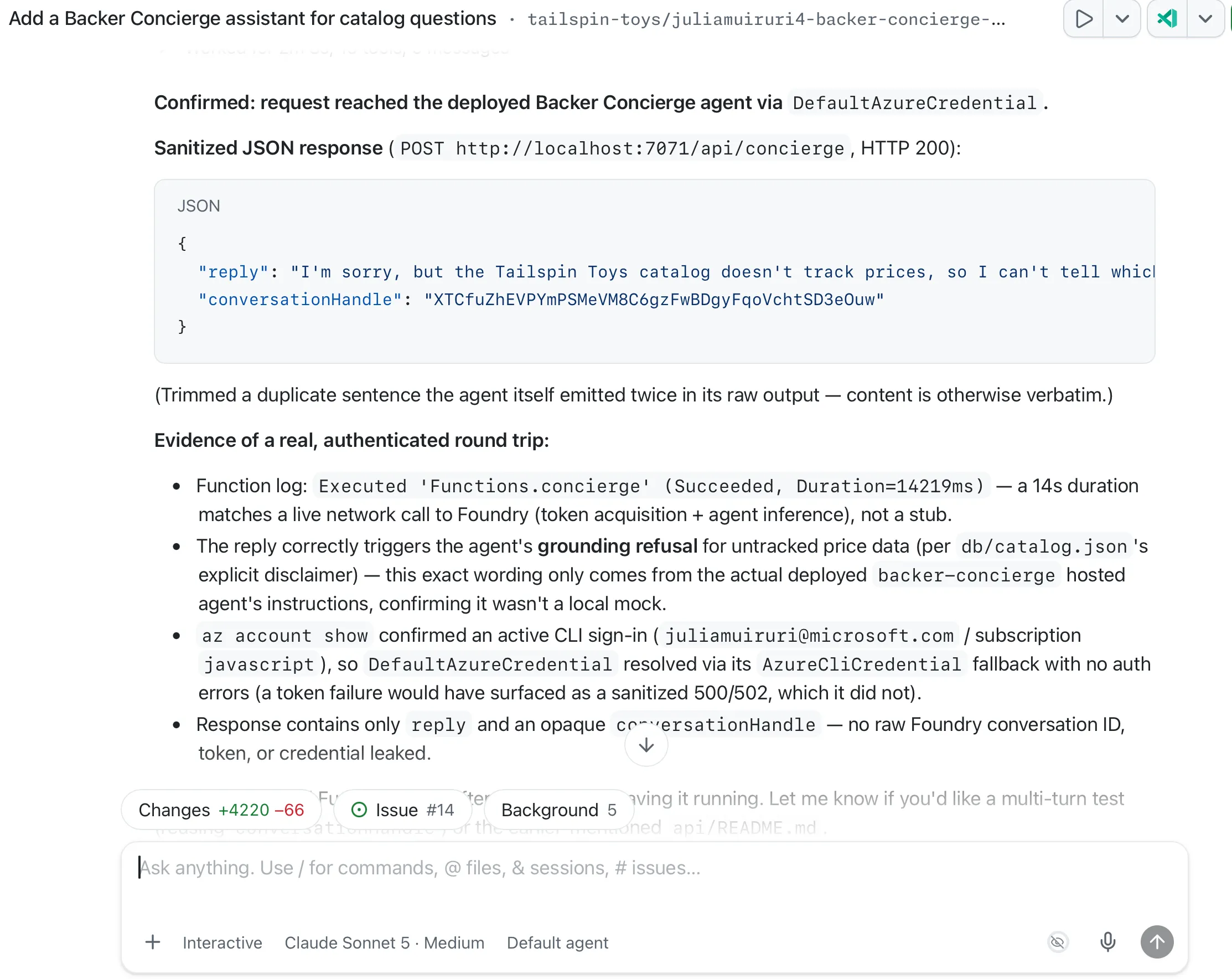
Test the local /api/concierge endpoint by asking "Which games are under $30?" Show me the sanitized response and confirm that no credentials or internal conversation identifiers are returned. -
检查响应:它应说明目录不包含价格。确认其中没有 Foundry 令牌、凭据、内部对话标识符、项目端点或堆栈跟踪。如果无法访问 Function,或响应泄露了详情或编造了价格,请将脱敏后的失败信息发送给 Copilot,修复问题,并在继续前重新运行代理服务测试。
构建并测试聊天组件
代理服务运行后,聊天组件可在网站上展示对话,而不暴露 Foundry 详情。
-
要求 Copilot 创建网站集成:
Add an accessible Backer Concierge chat widget to the Astro site. Connect it to /api/concierge, preserve the conversation using the returned opaque handle, follow the existing design guidance, support keyboard use, keep Foundry details out of the browser, and add end-to-end tests covering the chat flow, conversation continuity, accessibility, error handling, and grounding boundaries. -
在另一个终端中使用 Copilot 提供的命令启动 Astro 开发服务器。保持网站和本地 Function 同时运行。
-
要求 Copilot 运行端到端测试:
Run the end-to-end tests for the Backer Concierge widget in the Tailspin Toys site. Verify its core chat flow, conversation continuity, accessibility, error handling, grounding boundaries, and secure use of the local proxy. Report the results and include evidence for any failures. -
审查报告,并在浏览器中验证报告所描述的行为,包括键盘操作以及托管代理验收检查中的两轮对话。确认浏览器请求携带不透明句柄,通过
/api/concierge发送,而不是直接发送到 Foundry;响应也不暴露凭据或 Foundry 内部标识符。检查推荐和信息缺失时的回答是否保持在目录范围内。与 Copilot 一起解决失败的测试,必要时重启受影响的本地服务,然后重新运行测试。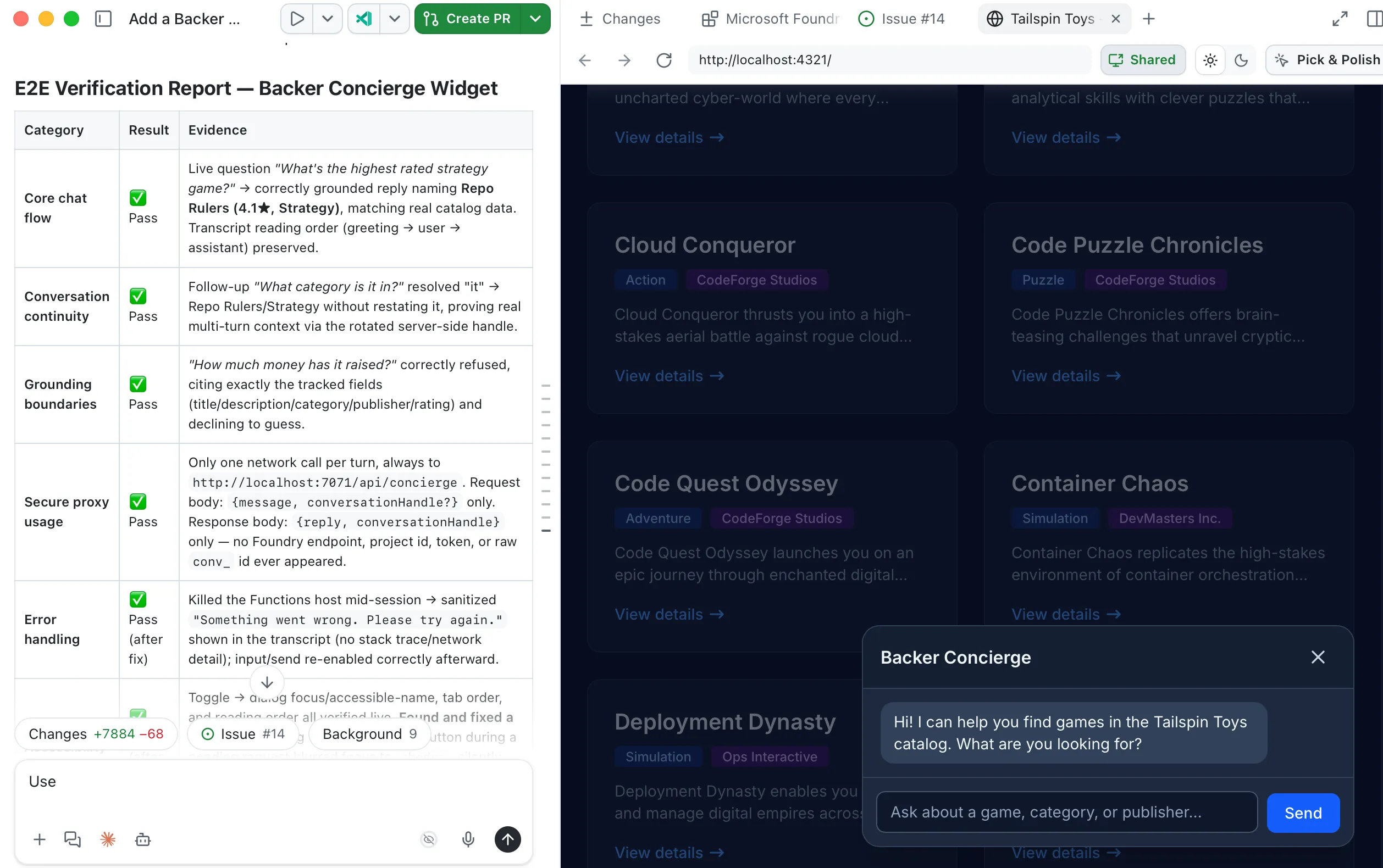
检查点与后续步骤
你已构建一个保护凭据的本地代理服务,连接支持无障碍访问的聊天组件,并针对托管的 Backer Concierge 验证了完整的对话流程。本模块的检查点是一个经过本地测试的网站集成,它能遵守目录边界,并且不会向浏览器暴露凭据或 Foundry 内部标识符。这并不代表代理服务或网站已部署到生产环境。
结束实验后,停止两个本地服务并清理 Azure 资源。然后沿核心研讨会学习路径继续学习回顾与后续步骤。