将代理连接到网站
| ← 上一模块:构建并部署代理 |
|---|
本模块将构建并部署代理中的托管代理连接到 Tailspin Toys。VS Code 中的 Copilot Chat 会创建本地集成,而不是公共生产端点。
目标
- 将凭据和 Foundry 对话标识符保留在本地服务器端代理服务中。
- 添加支持对话连续性的无障碍聊天小组件。
- 清理资源前,验证后端和完整体验。
场景
支持者应当无需离开目录,就能向推荐助手咨询建议。对话需要保留上下文、支持键盘操作,并保护私密连接详情。信任不仅取决于诚实的推荐,也取决于安全、无障碍的体验。
继续使用工作区
本次集成的目标是现有托管代理。Tailspin Toys 是完全预渲染的静态网站,因此浏览器代码无法安全保存代理的凭据。
- 在 VS Code 中打开同一个 Tailspin Toys 存储库,切换到
foundry-agent-vscode分支。确认上一个检查点中的托管代理在现有tailspin-toys项目中仍处于 Running 状态,且本地 Azure 登录指向其订阅。 - 以普通 Agent 模式打开 Copilot Chat,而不是 AIAgentExpert。选择 +,再选择 GitHub Issues,然后选择 Add a Backer Concierge assistant for catalog questions 议题并附加。
构建并验证本地代理服务
/api 中的本地 Azure Functions 代理服务保存连接详情,并在网站本地运行时转发请求。Copilot 可以使用 Azure skills 准备和验证该服务。
本工作坊的代理服务仅用于本地开发。不要将其部署为允许匿名访问的公共端点。生产环境需要针对应用的身份验证和防滥用措施,包括速率限制或配额、CORS 限制、监控和成本控制。
-
让 Copilot 创建代理服务:
Add a local Azure Functions proxy in api for the static Astro site to call my deployed Backer Concierge securely during development. Use my existing local Azure sign-in to call the hosted agent, keep all credentials out of the browser, protect conversation state with opaque handles, validate requests, sanitize errors, add focused tests, and configure the Astro dev server so /api requests reach the local Function. Don't create public deployment infrastructure. -
接受更改前先审阅。确认凭据和 Foundry 对话标识符始终保留在服务器端、本地设置已排除在版本控制之外、请求设有边界限制,且针对性测试通过。
-
构建 UI 前,先证明后端可以正常工作:
Start the local Functions host and test /api/concierge by asking "Which games are under $30?" Show me the sanitized response and confirm that no credentials or internal conversation identifiers are returned. -
检查终端响应。预期结果是有效的 JSON,其中
response属性包含回答,且不包含虚构的价格信息、凭据或内部对话标识符。如果检查失败,让 Copilot 修复,然后重复后端测试。 -
选择 Keep 保留更改,并使用 /clear,在同一个存储库和分支中为小组件开启全新聊天。保留本地代理服务配置和现有托管代理连接。
构建并测试小组件
UI 现在有了经过验证的后端。端到端测试将同时检查可用性和目录的信息边界。
-
让 Copilot 添加小组件:
Add an accessible Backer Concierge chat widget to the Astro site. Connect it to /api/concierge, preserve the conversation using the returned opaque handle, follow the existing design guidance, support keyboard use, and make it testable.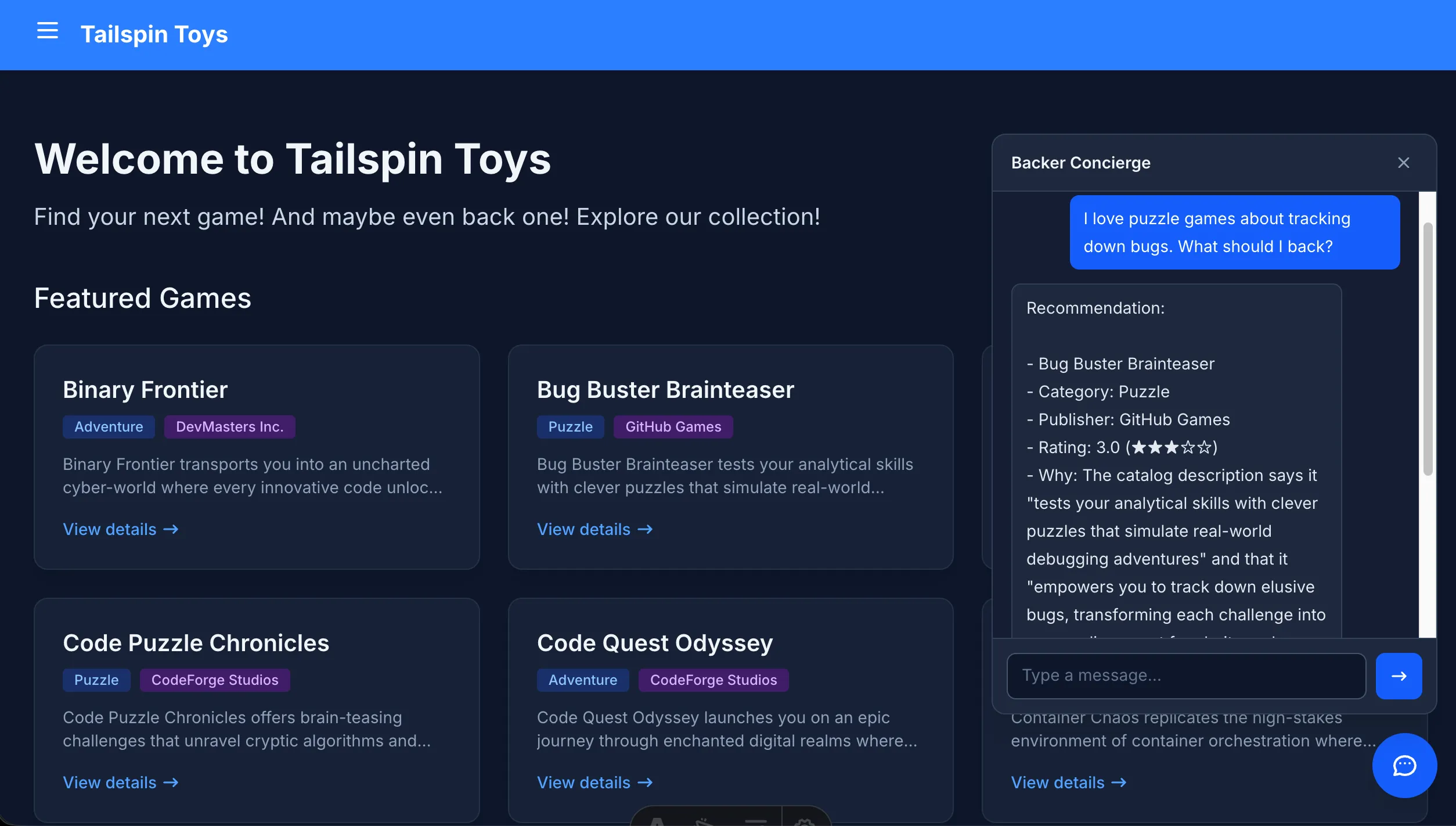
-
保持 Function 和网站运行,然后验证完整体验:
Use Playwright MCP to test the Backer Concierge widget end to end. Verify the core chat flow, conversation continuity, keyboard and accessibility behavior, grounding boundaries, and safe use of the local proxy. Report the results and fix any failures. -
根据议题验收标准审阅测试结果和更改:回答有数据依据、不虚构筹款金额、提出一个澄清问题、提供无障碍 UI 和端到端测试覆盖。确认失败项已修复,并重新运行受影响的检查。
完成检查点
你已构建可安全保管凭据的本地代理服务,接入了无障碍聊天小组件,并针对托管的 Backer Concierge 验证了完整对话流程。本模块的检查点是一个在本地通过测试的网站集成,它遵守目录边界,并使凭据和 Foundry 内部标识符不会暴露给浏览器。这不是代理服务或网站的生产部署。
体验结束后,请停止本地服务并清理 Azure 资源,以免持续产生费用。然后返回核心工作坊的 VS Code 概述。