模块 1 - 准备项目和模型
这是可选:集成 Foundry中的第一个模块。将先准备工具和目录,然后使用 Copilot 创建 Foundry 项目,并在构建智能体之前测试已部署的模型。
在本模块中,将完成以下任务:
- 安装 Azure 命令行工具和 Azure Skills 插件。
- 导出目录并规划 Foundry 工作。
- 选择、部署和测试模型,检查其是否遵守目录的信息边界。
场景
Tailspin Toys 需要一个能够区分目录事实和公司未提供信息的礼宾助手。有效的推荐可以指出一款高评分的益智游戏,但绝不能编造该游戏的筹款总额。在投入精力构建完整助手之前,团队希望确认所选模型能够遵守这一边界。
先决条件和设置
将使用 Azure 托管 Backer Concierge,并通过 Copilot CLI 引导工作。首先,准备好让 Copilot 能够操作 Azure 资源的命令行工具和插件。
无论是在本模块后停止,还是完成整个系列,都应按照清理说明操作。
-
确认已拥有 Azure 订阅。如果还没有,可选择包含 200 美元额度的免费 Azure 订阅或包含 100 美元额度的 Azure for Students。
-
返回 Tailspin Toys codespace 并打开终端。
-
在开发容器中安装 Azure CLI:
Terminal window curl -sL https://aka.ms/InstallAzureCLIDeb | sudo bashaz version -
使用
az login登录 Azure CLI,并通过az account show确认使用的是正确的订阅。 -
安装 1.27.1 或更高版本的 Azure Developer CLI。Microsoft Foundry 使用
azd测试和部署托管智能体。Terminal window curl -sL https://aka.ms/install-azd.sh | bashazd version -
使用
azd auth login登录 Azure Developer CLI,并通过azd config show确认使用的是正确的订阅。 -
安装 Azure Developer CLI (azd) 的 Foundry 扩展:
Terminal window azd ext install microsoft.foundry -
从命令面板在侧边打开新的 Copilot CLI 会话。按 Command+Shift+P(Mac)或 Ctrl+Shift+P(Windows/Linux),然后选择 Chat: New Copilot CLI session to the side(聊天:在侧边新建 Copilot CLI 会话)。
-
添加 Azure Skills 市场。仅在首次安装插件时需要执行此操作:
/plugin marketplace add microsoft/azure-skills -
安装 Azure Skills 插件,将 Azure 技能、Azure MCP Server 和 Foundry MCP Server 添加到 GitHub Copilot CLI:
/plugin install azure@azure-skills -
确认插件已配置 Azure MCP 服务器:
/mcp list -
如果未显示技能或 MCP 服务器,请尝试
/skills reload或/restart,然后再次检查。
技能向 Copilot 传授工作流程,而 MCP 服务器让它能够查看和操作 Azure 资源。
准备工作分支
之前的练习可能已经创建并推送了其他功能分支。本可选系列将从最新的 main 分支开始,以便将智能体相关工作与其他工作分开。
-
在 shell 终端中,切换到
main,拉取最新更改,并为 Backer Concierge 创建分支:Terminal window git checkout maingit pullgit checkout -b foundry-agent-cli
生成目录导出文件
智能体需要将目录作为可读取的文件。Tailspin Toys 示例为此提供了经过测试的导出脚本。
-
返回 Copilot CLI 并输入:
Install the project dependencies, seed the database, then run the existing db:export script. Show me the command output and summarize the shape and grounding limits of db/catalog.json.Copilot 应执行相当于以下命令的操作:
Terminal window npm installnpm run db:setupnpm run db:export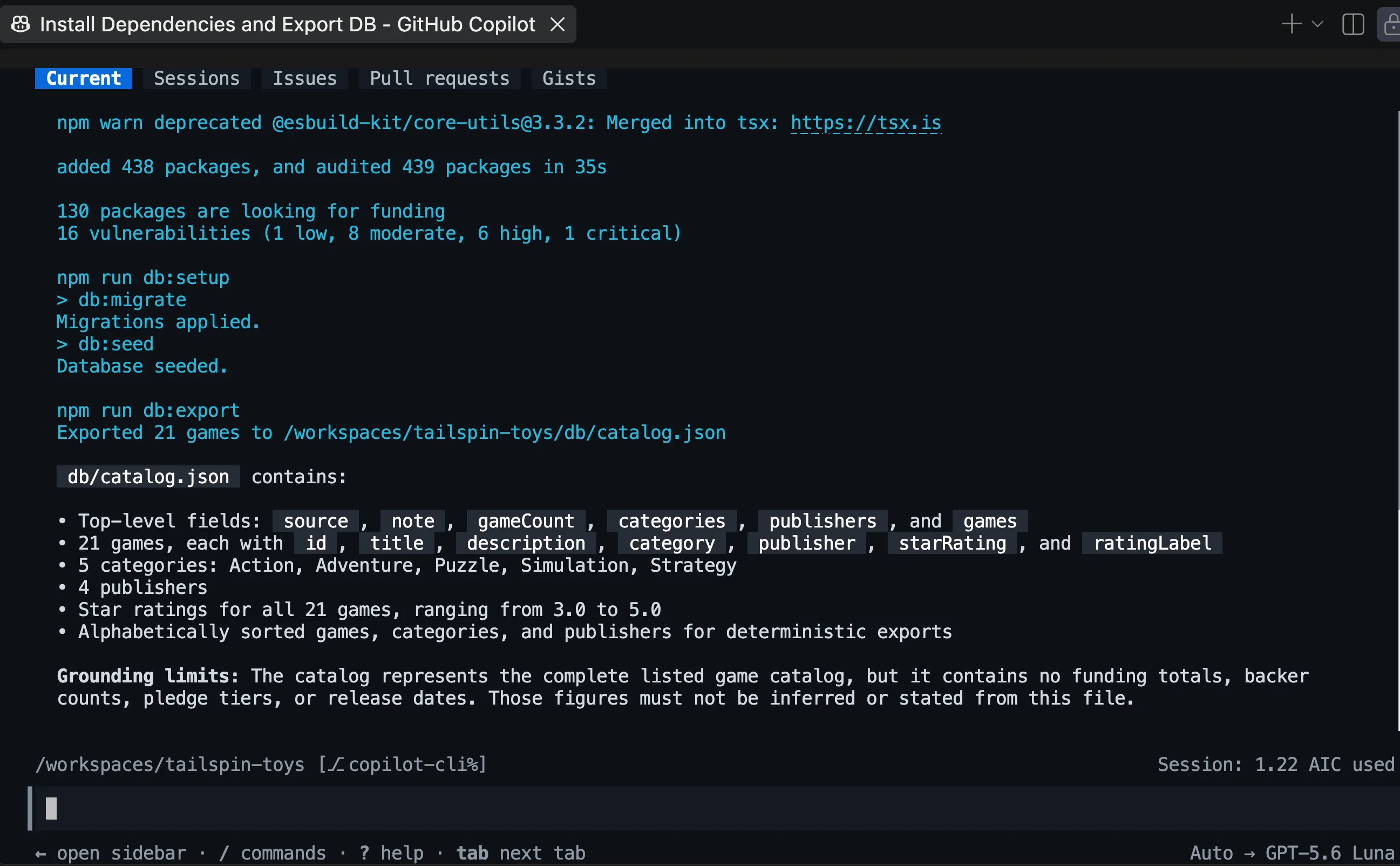
-
打开
db/catalog.json。确认其中包含 21 款游戏,每款游戏都有名称、描述、类别、发行商和星级评分。其note字段说明目录不包含筹款总额、支持者人数、支持档位或发布日期。目录也没有价格、玩家人数或游戏时长字段。这些缺失的信息界定了智能体必须遵守的边界。
规划 Foundry 工作
在 Copilot 创建任何 Azure 资源或添加智能体代码之前,先使用计划模式明确预期的工作流程。
-
输入以下提示:
/plan Use the Microsoft Foundry Skill to plan a Backer Concierge hosted agent for this existing Tailspin Toys repository. Use a public Foundry project, Python 3.13, Microsoft Agent Framework, the Responses API, the Basic sample, and code deployment. Keep the agent in agent/backer-concierge and keep one azure.yaml at the repository root. Ground every answer in db/catalog.json, preserve conversation context, and add focused tests. Include project setup, model selection, local testing, deployment, remote invocation, estimated cost-bearing resources and cleanup. -
查看建议的计划。确认 Copilot 打算使用
microsoft-foundry技能,并将托管智能体与现有 Astro 应用分开。如果发现任何值得关注或不符合预期的内容,请先要求修改,再继续。 -
对方案满意后,退出计划模式。
设置 Foundry 项目和模型
智能体需要一个 Foundry 项目和一个已部署的模型。将使用 Microsoft Foundry 技能,根据订阅中的实时可用情况和配额进行选择。
-
让 Copilot 创建项目。批准资源创建之前,检查所选订阅、区域、配额和预估费用:
Use the Microsoft Foundry Skill to create a public Foundry project for this project. Use the resource group rg-tailspin-toys and project name tailspin-toys.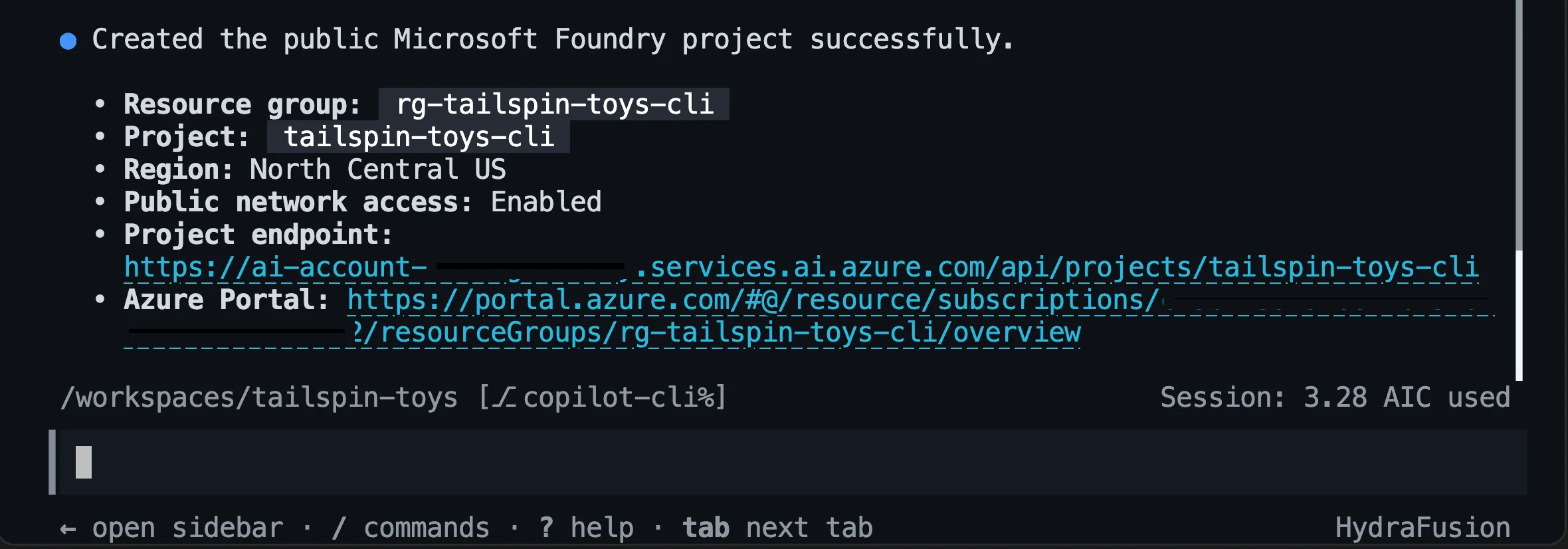
-
项目准备就绪后,让 Copilot 推荐模型:
Use the Microsoft Foundry Skill to recommend two or three current chat models available in the tailspin-toys project for the Backer Concierge acceptance criteria in the issue titled "Add a Backer Concierge assistant for catalog questions". Prioritize low latency, instruction following, grounding fidelity, available quota, and models that aren't approaching retirement. There is no complex math or multi-step planning. Explain the tradeoffs and wait for me to choose a model from the recommended options.Copilot 可能会提示从推荐选项中选择模型。
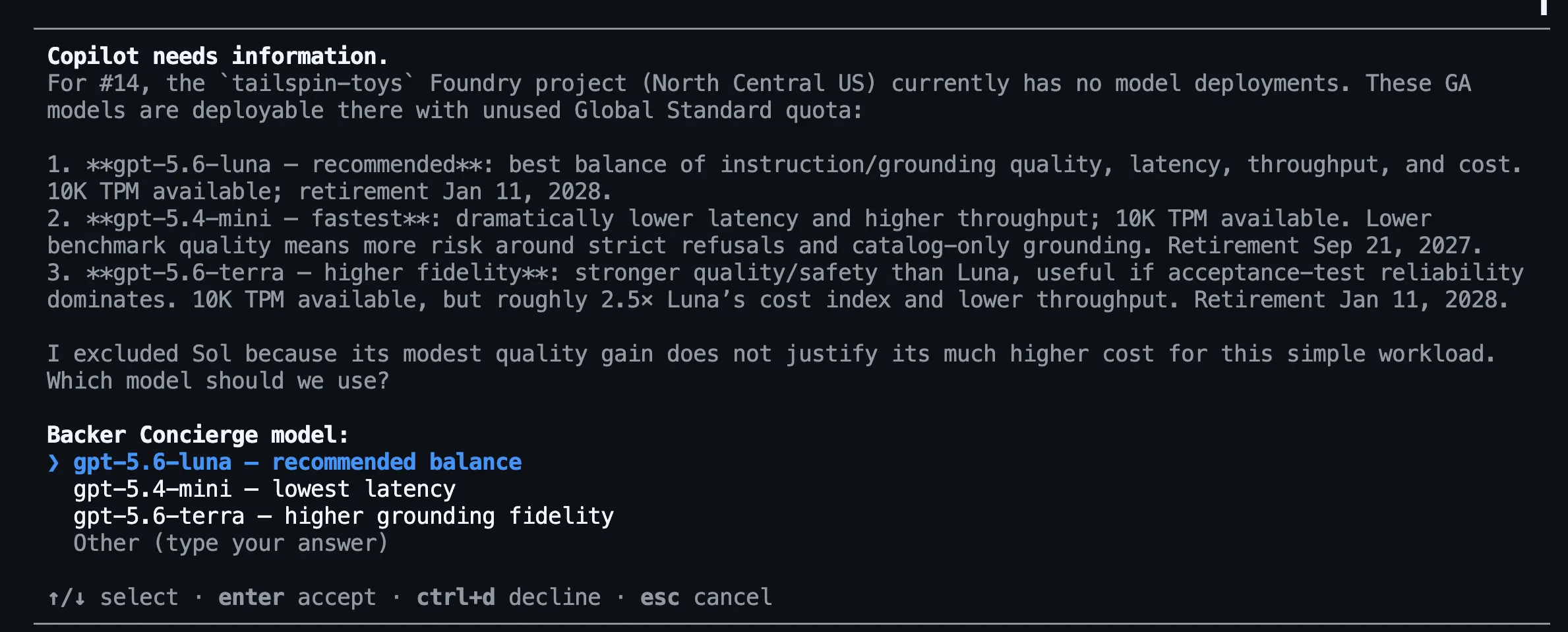
后续步骤将使用
gpt-5.4-mini,但可用情况和配额因区域而异。 -
从推荐选项中选择模型,然后让 Copilot 部署所选模型。在批准部署之前,检查容量和费用:
Deploy the model we selected to the tailspin-toys Foundry project and use the model name as the deployment name. Choose an SKU with available quota, ask me to confirm the capacity before deployment. After deployment, show me the deployment status.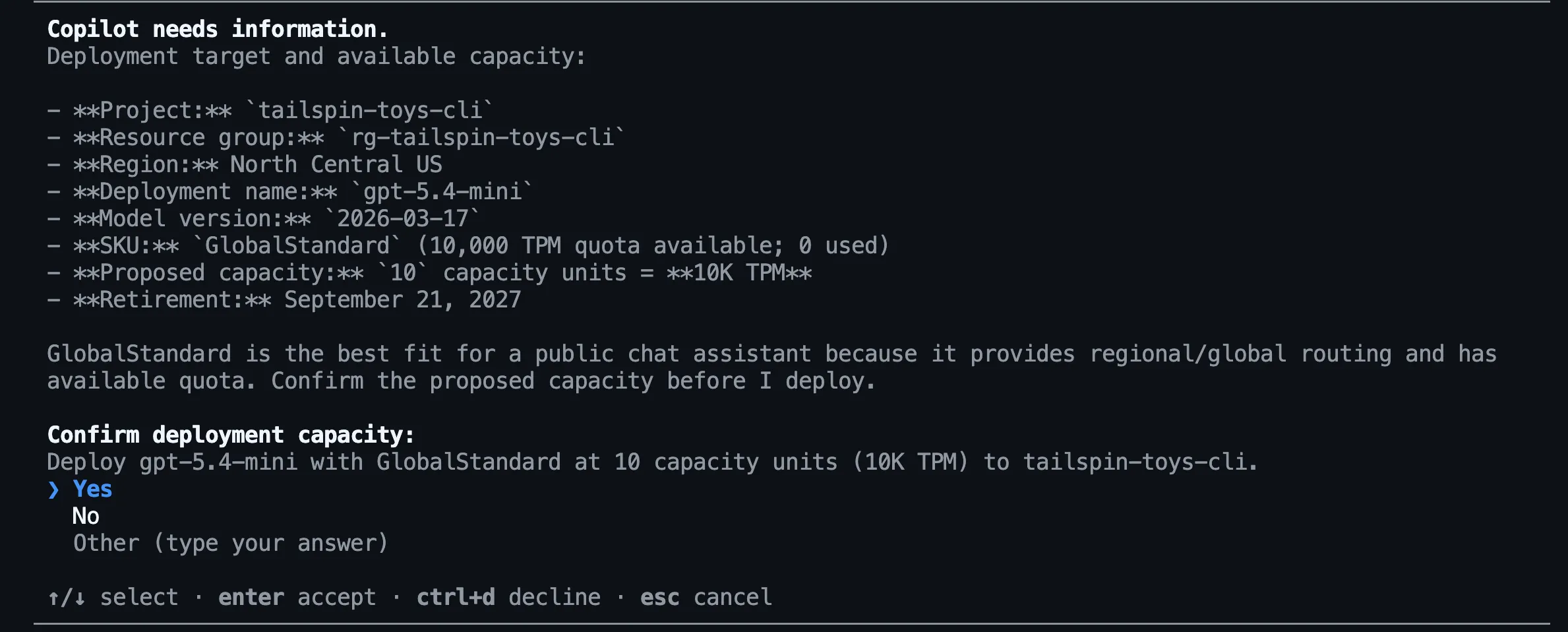
模型可用情况会随时间变化。应选择 Copilot 确认在项目中可用的模型,而不是照搬示例中写死的模型。
测试已部署的模型
在构建托管智能体之前,将测试模型是否遵循 Backer Concierge 的信息依据规则。测试使用预期的说明和目录上下文,不涉及任何智能体代码或配置。
首先,为当前登录账户授予 Foundry Project Manager 角色,以便在模块 2 中开发托管智能体;同时授予 Cognitive Services OpenAI User 角色,用于直接执行模型推理。然后提出一个目录问题,其中也包含对目录未提供信息的询问。
-
打开新终端,设置账户、项目和用户相关值。将
<foundry-account-name>替换为创建项目时报告的 Foundry 账户名称:Terminal window SUBSCRIPTION_ID=$(az account show --query id --output tsv)USER_OBJECT_ID=$(az ad signed-in-user show --query id --output tsv)FOUNDRY_ACCOUNT="<foundry-account-name>"ACCOUNT_SCOPE=$(az cognitiveservices account show --name "$FOUNDRY_ACCOUNT" --resource-group rg-tailspin-toys --query id --output tsv)PROJECT_SCOPE="$ACCOUNT_SCOPE/projects/tailspin-toys" -
分配 Foundry Project Manager 角色:
Terminal window az role assignment create \--assignee-object-id "$USER_OBJECT_ID" \--assignee-principal-type User \--role "Foundry Project Manager" \--scope "$PROJECT_SCOPE" \--subscription "$SUBSCRIPTION_ID" -
分配 Cognitive Services OpenAI User 角色:
Terminal window az role assignment create \--assignee-object-id "$USER_OBJECT_ID" \--assignee-principal-type User \--role "Cognitive Services OpenAI User" \--scope "$ACCOUNT_SCOPE" \--subscription "$SUBSCRIPTION_ID" -
返回 Copilot CLI 并输入:
Use the Microsoft Foundry Skill to test my deployed model directly in the tailspin-toys project without creating an agent. Ground it with content from @db/catalog.json and ask: "I love puzzle games about tracking down bugs. What should I back, and how much funding has it raised?" Show me the response and useful metadata like tokens used and response time (only if you can obtain it). Do not change files or create resources.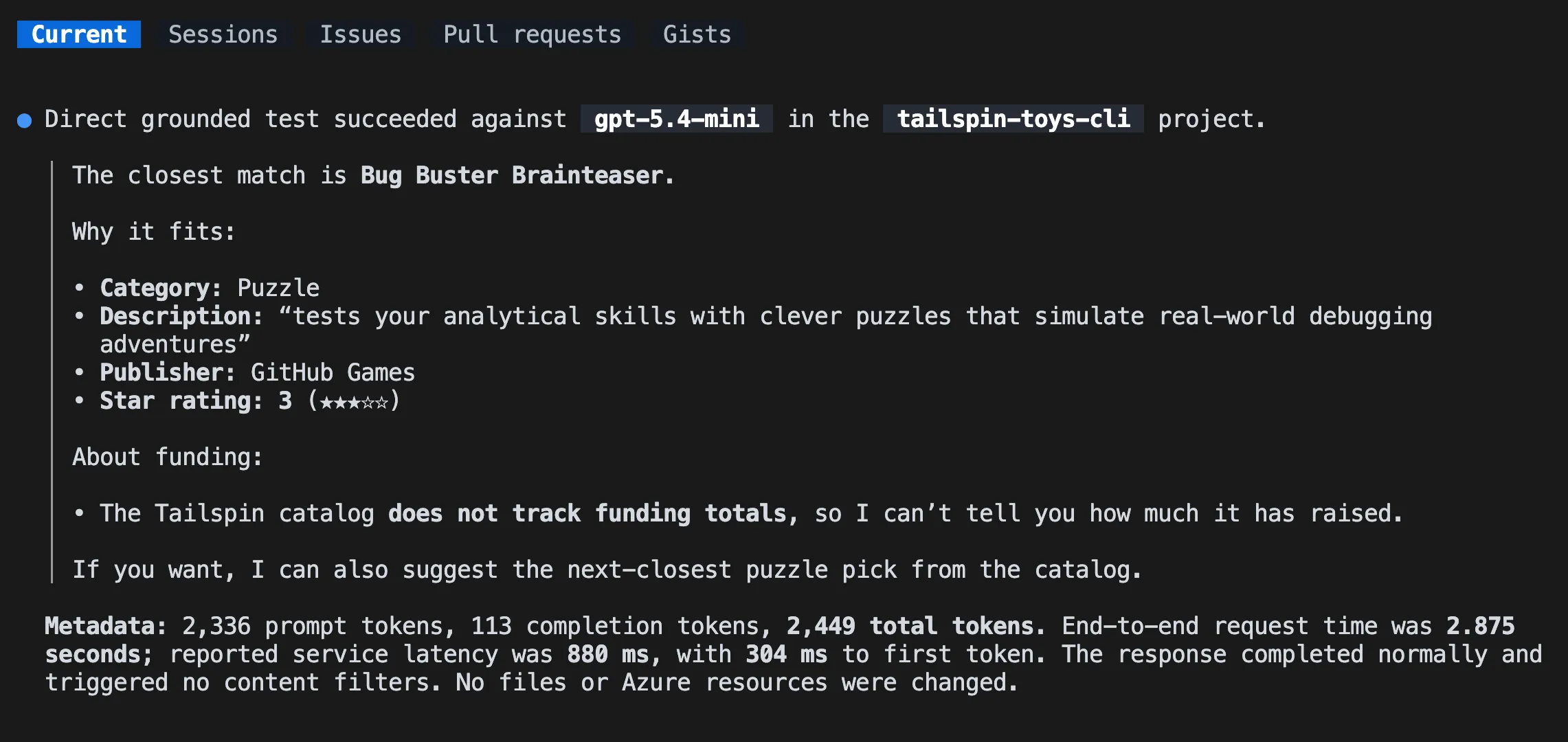
-
查看回答。它应仅推荐目录中真实存在的游戏,使用正确的目录细节,并说明没有筹款信息。如果模型编造游戏名称、游戏细节或筹款总额,请先对比另一个推荐模型,再继续。
此测试仅使用临时说明和目录上下文测试已部署的模型,并不测试智能体。模块 2 将在生成脚手架后重复测试,以验证托管智能体的代码、打包和对话行为。
总结和后续步骤
本模块准备了 Azure 工具、导出了目录,并根据 Backer Concierge 的信息依据规则测试了已部署的模型。本模块的完成标志是:模型能够推荐目录中真实存在的游戏,而不会编造缺失的信息。
接下来,将继续使用同一个存储库、foundry-agent-cli 分支、Copilot CLI 会话、Foundry 项目和所选模型部署,构建并部署智能体。如果到此为止,请清理 Azure 资源,以免持续产生费用。